Real Time Video Conference System
Negotiable Min Order Quantity Unit
- Required Quantity
-
- Place of Origin
- Brand name
- WOOAM
- Payment Terms
- Negotiable
- Production method
- Negotiable
- Shipping / Lead Time
- Negotiable / Negotiable
- Category
- Business Services , Computer Software
Wooam Co., Ltd.
 South Korea
- Verified Certificate
-
11


| Product name | Real Time Video Conference System | Certification | - |
|---|---|---|---|
| Category |
Business Services
Computer Software |
Ingredients | - |
| Keyword | business services , econference , real time video conference system | Unit Size | - |
| Brand name | WOOAM | Unit Weigh | - |
| origin | Stock | - | |
| Supply type | - | HS code | - |
Product Information
eConferenceReal │ Time Video Conference System
│ Description │
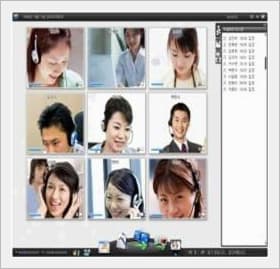
>>Real-time video conference system
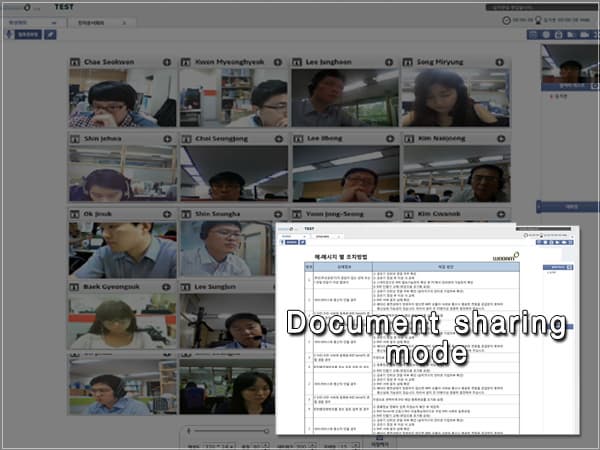
As a web browser-based video conference system, the first of its kind in Korea, it can be used in various system environments such as Cross OS (Windows, Linux, and Macintosh) and Cross Browser (Explorer, Safari, and Chrome) and provides an excellent environment in which Web can be used without installation. It can also be used for live video conference, video education/seminar, electronic document conference, or remote video interview.
>>Execution screen
│ Features and advantages │
- As it is developed as a Web-based system, you do not need to install Web.
- As it has Cross OS /Cross Browser, it can be run in various environments.
- More than 50 persons can connect to an individual conference room at the same time.
- It can be used for remote real-time video conference, lecture, public hearing, and staff conference.
- Document sharing / screen sharing / video sharing / file sharing / Recording support
- Document synchronizing
- Supporting a variety of document formats
- Intuitive user interface
│ Major functions │
|
Document |
|
|
Audio/video conference function |
|
|
Conference function |
|
|
Integrated control function |
|
|
Optional function |
|
│ Product standards │
|
Division |
V7.5 |
|
Product environment |
Web Browser base |
|
Video Codec |
VP6, H.264 |
|
Audio Codec |
G.711, SPXEE, MP3 |
|
Development environment |
FLEX Builder4.6 |
|
Self-diagnosis |
Support |
|
Recording |
Support (WMV) |
|
Resolution |
It is automatically adjusted according to the resolution of the monitor. |
|
Web sharing |
Support (It does not support pop-up.) |
|
layout |
Free Talk |
|
Video sharing |
Support (FLV) |
|
Screen sharing |
Support |
|
O/S |
Windows 7 |
|
Mobile support |
It does not support mobile. |
|
Server |
Windows 2003, 2008, Linux |
|
User program |
Flash player 11 |
B2B Trade
| Price (FOB) | Negotiable | transportation | - |
|---|---|---|---|
| MOQ | Negotiable | Leadtime | Negotiable |
| Payment Options | Negotiable | Shipping time | Negotiable |
- President
- Song HaeJa
- Address
- 225-15, Pangyoyeok-ro, Bundang-gu, Seongnam-si, Gyeonggi-do, Korea
- Product Category
- Computer Software,Energy Projects,Other Energy Related Products
- Year Established
- 1993
- No. of Total Employees
- 1-50
- Company introduction
-
Wooam Co., Ltd. a leading enterprise having been supplying the consistently developing & enhancing Video Conference System and Electronic Document Conference System to major country wide municipal government offices & public institutions inclusive of central government offices since the establishment in 1993, has occupied a solid position proudly taking over 50% market share. Recently, Wooam Co., Ltd. has expanded its scope of business to the Energy & environment related fields with the mose specialized & professional consulting services growing the annual sales by over 50%. Wooam Co., Ltd. is a state-of-art solutions technology development enterprise interlocking the variety of IT technologies offering a Video Conference System allowing the massive number of subscribers cooperate on real time basis, which will remarkable improve the ineffective conventional conference practices & culture with innovative innovation in conferencing tasks. Wooam Co., Ltd. has been providing the Total Solution Services for customers through the comprehensive consulting & engineering expertise based on the years of sufficient experience, know-how & technolgy of excellence accumulated over last 10 years.
- Main Product