


Visual CG 3D
Negotiable Min Order Quantity Unit
- Required Quantity
-
- Place of Origin
- Payment Terms
- Negotiable
- Production method
- Negotiable
- Shipping / Lead Time
- Negotiable / Negotiable
- Keyword
- broadcasting, broadcasting equipment, cg, character generator
Visual Research Inc.
- Verified Certificate
-
12


| Product name | Visual CG 3D | Certification | - |
|---|---|---|---|
| Category |
Radio & TV Broadcasting Equipment
Computer Software |
Ingredients | - |
| Keyword | broadcasting , broadcasting equipment , cg , character generator | Unit Size | - |
| Brand name | - | Unit Weigh | - |
| origin | Stock | - | |
| Supply type | - | HS code | - |
Product Information
VisualCG 3D
Overview
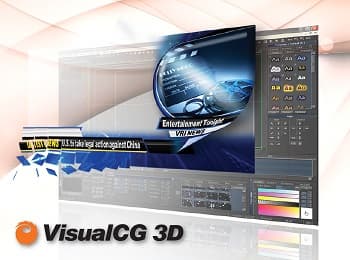
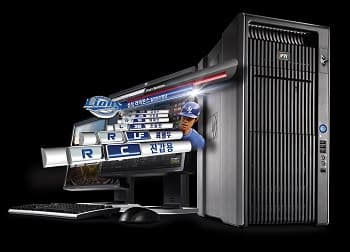
VisualCG® 3D is a powerful real-time 3D character generator that can be used to create 2D/3D titling and motion graphics effects for professional broadcasters, contents creators and television service providers.
With VisualCG® 3D, text and shapes can be fully modified to 3D object with a few simple operations, and displayed with over 200 real-time transition effects. Keyframe object and timeline animation control provides extensive multi-layer control over the display of all graphic elements.
Features
∙ Full Unicode true type font support
∙ Real-time one-step 3D text conversion
∙ Import a wide variety of graphic file formats including BMP, TGA, TIFF, JPG, PSD,GIF, AI, X-file
(Autodesk® Maya® and 3ds Max®)
∙ Real-time key frame animation
∙ Over 200 customizable real-time transition effects
∙ Up to 6 multi layer display of still, crawl, roll and animation
∙ TGA sequence clip playback up to 1920 x 1080
∙ Seamless background clip playback with no black
∙ HD/SD switchable in software
∙ On-air updates: Edit or add new templates while on-air for last minute changes
Minimum System Requirements
HD/SD
CPU Dual Intel Xeon E5-2609 2.4GHz
RAM 4GB
VGA Nvidia Geforce GTX660
OS Windows XP or Windows 7 (32-bit or 64-bit)
SD
CPU Intel Xeon E5-2609 2.4GHz
RAM 2GB
VGA Nvidia Geforce GTX640
OS Windows XP or Windows 7 (32-bit or 64-bit)
Supported Video boards
∙ Matrox® Video: DSX_XMIO2™, DSX_SD™
∙ AJA® Video: Kona LHe Plus™
∙ Blackmagic Design®: DeckLlink® HD Extreme 3D™, DeckLink®4K Extreme
* All trademarks are the property of their respective owners.
VisualCG 3D
Overview
VisualCG® 3D is a powerful real-time 3D character generator that can be used to create 2D/3D titling and motion graphics effects for professional broadcasters, contents creators and television service providers.
With VisualCG® 3D, text and shapes can be fully modified to 3D object with a few simple operations, and displayed with over 200 real-time transition effects. Keyframe object and timeline animation control provides extensive multi-layer control over the display of all graphic elements.
Features
∙ Full Unicode true type font support
∙ Real-time one-step 3D text conversion
∙ Import a wide variety of graphic file formats including BMP, TGA, TIFF, JPG, PSD,GIF, AI, X-file
(Autodesk® Maya® and 3ds Max®)
∙ Real-time key frame animation
∙ Over 200 customizable real-time transition effects
∙ Up to 6 multi layer display of still, crawl, roll and animation
∙ TGA sequence clip playback up to 1920 x 1080
∙ Seamless background clip playback with no black
∙ HD/SD switchable in software
∙ On-air updates: Edit or add new templates while on-air for last minute changes
Minimum System Requirements
HD/SD
CPU Dual Intel Xeon E5-2609 2.4GHz
RAM 4GB
VGA Nvidia Geforce GTX660
OS Windows XP or Windows 7 (32-bit or 64-bit)
SD
CPU Intel Xeon E5-2609 2.4GHz
RAM 2GB
VGA Nvidia Geforce GTX640
OS Windows XP or Windows 7 (32-bit or 64-bit)
Supported Video boards
∙ Matrox® Video: DSX_XMIO2™, DSX_SD™
∙ AJA® Video: Kona LHe Plus™
∙ Blackmagic Design®: DeckLlink® HD Extreme 3D™, DeckLink®4K Extreme
* All trademarks are the property of their respective owners.
- Product Info Attached File
B2B Trade
| Price (FOB) | Negotiable | transportation | - |
|---|---|---|---|
| MOQ | Negotiable | Leadtime | Negotiable |
| Payment Options | Negotiable | Shipping time | Negotiable |
- President
- Kim Changwon
- Address
- 2-1001, 775 Gyeongin-ro, Yeongdeungpo-gu, Seoul, Korea
- Product Category
- Computer Hardware & Software,Computer Software,Radio & TV Broadcasting Equipment
- Year Established
- 1995
- No. of Total Employees
- 1-50
- Company introduction
-
<p>Visual Research Inc. is a specialized manufacturer of professional on-air graphics solutions for the broadcast industry. Established in 1993, VRi has been providing high-quality and cost-effective real-time broadcast graphics solutions with user friendly production environments. From basic character generation to full 3D graphics production in HD/SD platforms, VRi graphics solutions offer an outstanding quality at a competitive price. Today, VRi products are used for broadcasting various television programs by major stations throughout the world. VRi is putting utmost efforts to research and develop differentiated graphics solutions that are easy to use and most suitable for the new broadcast environments and to increase quality of services.
- Main Markets
-
 Japan
Japan
 South Korea
- Main Product

Related Products

Alldata 10.53 Mitchell ondemand 5 5.8 Autodata ETKA 7.4

Tayo the Little Bus (Animation)
HLF 400 Cable

Kobuki
VR Firefighting Danger Prediction Training System - DAPREs


