


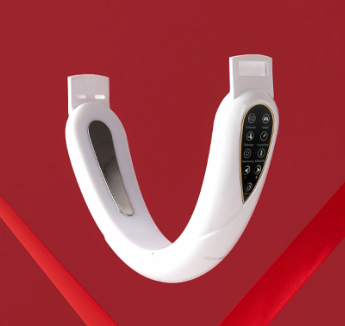
Beaund N Mode
A lifting device that strengthens the elasticity of facial muscles with 5 types of EMS microcurrent and LED.
Negotiable Min Order Quantity Unit
- Required Quantity
-
- Place of Origin
- China
- Brand name
- Beaund
- Payment Terms
- D/A,L/C,Others,T/T
- Production method
- Available,ODM,OEM
- Shipping / Lead Time
- Negotiable / Negotiable
- Category
- Other Beauty Products , Other Personal Care , Beauty Devices , Face Massagers , Other Home Care
COSME Co., Ltd
- Membership
- VIP
- Recent Visit
- Jan 24, 2025
- Country / Year Established
-
 South Korea
/
2022
South Korea
/
2022
- Business type
- Manufacturer
- Verified Certificate
-
2

| Product name | Beaund N Mode | Certification | - |
|---|---|---|---|
| Category |
Other Beauty Products
Other Personal Care Beauty Devices Face Massagers Other Home Care |
Material | - |
| Keyword | homecare , led therapy , face massage device , facial lifting device | Unit Size | - |
| Brand name | Beaund | Unit Weigh | - |
| origin | China | Stock | 10000 |
| Supply type | Available,ODM,OEM | HS code | - |
Product Information
Beaund N Mode
The Best-Selling V-Band by Beaund
13 Times Sold Out, Over 6,500 Reviews with a 4.9-Star Rating
Now Available in Department Stores
Featured in VIP Aesthetic Shops and N Mode
Beyond Home Care, It's N Mode
Perfect for:
- Those concerned with double chins or sagging jawlines
- Those with drooping facial or chin skin, or undefined jawlines
- Those who find using gua sha or galvanic devices too tedious
- Those who experience facial puffiness from frequent late-night snacks or social drinking
5 EMS Microcurrent Modes
Care for your deep facial muscles, enhancing elasticity from within.
N Mode Features:
- Usage: Wearable device
- LED Function: Yes
- EMS Function: Yes
- Intensity Levels: 1 to 15
Did You Know?
Your jaw has four muscles. If not properly maintained, these muscles can become fixed and less elastic due to gravity. Simply treating the surface isn’t enough—sagging is inevitable if the deeper muscles aren’t cared for.
EMS Panel Size:
The larger the EMS panel, the more comprehensive the care.
Size: 7.5 cm
LED Modes:
LED in EMS products is not optional—it’s essential.
LED wavelengths of 400–760nm, similar to PDT, with 5 modes tailored to different skin types.
- BLUE LED: Knead Mode
Stimulates muscles with soft, rapid pulses. - VIOLET LED: Massage Mode
Gently pulls and stimulates deep muscles. - GREEN LED: Acupuncture Mode
Delivers microcurrents deep into muscle layers with rapid pulses. - ORANGE LED: Hammering Mode
Stimulates deep muscles with strong, intense pulses. - RED LED: Automatic Mode
Automatically cycles through the above four modes for comprehensive muscle stimulation.
EMS Pad Mode:
Connect the EMS pad to the N Mode device for targeted muscle massage across various body parts—shoulders, arms, back, waist, knees, and more.
Massage Mode:
Constant vibration massage mode during use.
Enhances the effects of EMS and LED with approximately 30,000 vibrations per minute.
World-Class Quality
Beaund N Mode has passed stringent certifications, including KC, FCC, CE, and RoHS.
How to Use:
- The EMS microcurrent stimulates deep muscles, which may feel unfamiliar at first. We recommend starting on the lowest setting.
- Step 1: Remove the transparent film from the EMS massage panel.
- Step 2: Wipe the EMS massage panel with a wet wipe or damp cloth.
- Step 3: Attach the head strap to the main device.
- Step 4: Apply skincare products like cream, serum, or moisturizer.
- Step 5: Press and hold the power button to turn on the device. It will beep when activated.
- Step 6: The device starts in Automatic Mode. Press the power button briefly to switch modes.
- Step 7: Test the intensity level on your inner arm or thigh.
- Step 8: Adjust the head strap to fit snugly and use on your face.
- Step 9: Press and hold the power button again to turn off the device. The recommended usage time is 15 minutes per day.
Tip: Apply a generous amount of skincare products before using the device for deeper muscle stimulation.
B2B Trade
| Price (FOB) | Negotiable | transportation | Air Transportation,Negotiation Other,Ocean Shipping |
|---|---|---|---|
| MOQ | Negotiable | Leadtime | Negotiable |
| Payment Options | D/A,L/C,Others,T/T | Shipping time | Negotiable |
COSME Co., Ltd
- Country / Year Established
-
South Korea
/
2022
- Membership
- VIP
- Recent Visit
- Jan 24, 2025
- Business type
- Manufacturer
-
2
- President
- Park Sung Cheol
- Address
- Hakdong-ro 343, 8th floor, Gangnam-gu, Seoul, Korea
- Product Category
- Bath Supplies,Beauty Equipment,Facial Care,Makeup,Other Beauty Products
- Year Established
- 2022
- No. of Total Employees
- 1-50
- Company introduction
-
- Main Markets
-
 Australia
 India
India
 Singapore
 U.S.A
U.S.A
 Viet Nam
- Main Product


Related Products
Vitamin Multi filtered Shower head(US CEC Certified)
Hydrogen Miracle Water WS1212
Natale Deep Moisture Cream 200ml Newborns, Infants and Dry skin, Atopy, and Sensitive Skin Care
Poseion Beauty Care Shower head
ANACELL - Alopecia prevention solution approved by the Ministry of Food and Drug Safety in Korea


