E-Station Z - Smart Podium
Negotiable Min Order Quantity Unit
- Required Quantity
-
- Place of Origin
- Payment Terms
- Negotiable
- Production method
- Negotiable
- Shipping / Lead Time
- Negotiable / Negotiable
- Keyword
- Category
- Education Supplies
B&S Media Co., Ltd.
 South Korea
- Verified Certificate
-
12


| Product name | E-Station Z - Smart Podium | Certification | - |
|---|---|---|---|
| Category | Education Supplies | Ingredients | - |
| Keyword | - | Unit Size | - |
| Brand name | - | Unit Weigh | - |
| origin | Stock | - | |
| Supply type | - | HS code | - |
Product Information
Introduction
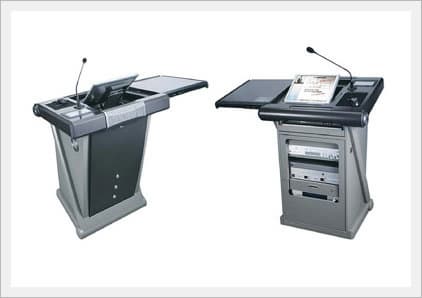
e-STATION Z is an advanced Smart Podium for classrooms, conference rooms, auditoriums, training centers, etc. Integrated Controller in e-STATION Z makes it possible to control and utilize various equipments. User can operate equipments by touch on the LCD touch panel in e-STATION Z.
Features
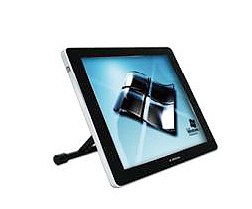
- 19" Tablet Monitor with Height Adjustable Stand
- Change the tablet monitor viewing angle for your convenience. Touch and control the computer screen with the touch pen. - Extra I/O Port
- Connect equipment such as a Laptop, Document camera, USB and additional Microphone. - 7" LCD Touch Panel
- Control various equipment by simply touching the buttons. - Computer Mouse Pad
- Control the computer screen with not only a pen tool, but also a computer mouse for your convenience. - 19" Rack Shelves & Drawer (1&2 U Rack Type)
- Mount equipment on a 19" rack-mount shelving unit or store your equipment on adjustable shelves. - Keyboard Tray
- Utilize keyboard conveniently on the e-STATION S. - Cooling Fan
- It generates cooling airflow inside of podium, allowing the components to run smoothly and last longer. - Mobile Design
- Move the lectern easily. The 4 wheels make the lectern move easily.
Smart Podium Components
 |
 |
| Tablet Monitor JPM-T19(19˝)x1 |
System Controller JPM-C210E+CL7Ax1 |
 |
 |
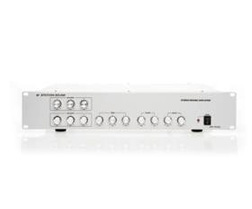
| Power Amplifier JPM-PA200x1 |
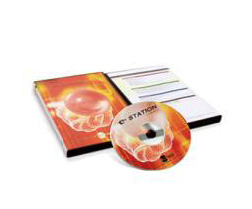
lecture recording S/W e-STATION PRO4.0x1 |
 |
 |
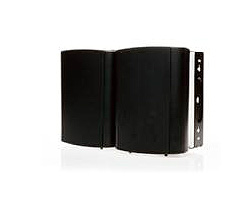
| Speakers JPM-SP80x2 |
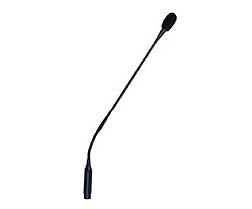
Condenser MIC. JPM-MC100x1 |
 |
|
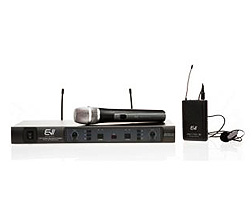
| Wireless MIC. JPM-WRX700x1 |
Specifications
Smart Podium
| PHYSICAL | |
| Size | 700mm(W) x 1200mm(H) x 720mm(D) (27" x 47" x 28") 19 inch rack use for A/V equipment |
| Weight | 80 kg |
| Equipment Storage Area | 500mm (W) x 420mm (H) x 720mm (D) |
| STANDARD FEATURES | |
| Material | Poly Carbonate(Body) & Steel(Rack) |
| Motorized angle | DC 12V / Gear type Wheel-Sliding operation Top Cover Secure Sensor |
| Cooling Fan Sensor | Cooling Fan and Sensor Operates over about 45°C inside body |
| Extra I/O Port | Power outlet, USB, LAN, Composite, RGB, Mic. Audio jack. |
| Cabinet Finishes | Gray /Silver |
| Mobility | Roll-about, 4-wheels |
| Rack Mount Storage | 19 inch rack-mount |
| Keyboard Shelf | Pull-out shelf under e-STATION-Top |
| Security | Locking front & sliding cover doors |
| Power | 110/220/240V AC |
| Warranty | One-year limited equipment warranty |
Other Components
| LCD Tablet Monitor (JPM-T19) | |
| Size | 19" LCD Tablet Monitor (4:3) |
| Pen | Wireless Electronic |
| Brightness | 300CD/m2 |
| Integrated Controller (JPM-C210E/CL7A) | |
| Type | Touch Panel control |
| Software | Programmable Flash |
| UART | RS-232 port use |
| Ethernet | Remote Control via LAN |
| Wireless Microphone (JPM-WRX700) | |
| Components | 2CH receiver, 1 hand microphone, 1 Pin microphone |
| Max. Channels | 32 Channels |
| Frequency Range | UHF 740.00MHz / 752.00Mhz |
| Battery Life | 8Hours |
| Microphone (JPM-MC100) | |
| Type | Gooseneck Microphone |
| Frequency Range | 100~16,000Hz |
| Power Amplifier (JPM-PA200) | |
| Power Output | 200W (100W x 100W) |
| Input signals | Analog AUX(L/R:RCA) Unbalanced 4CH MIC. (Balanced: XLR)3CH |
| Output signals | Analogue AUX(L/R:RCA) Unbalanced 2 CH, Speaker connector(L/R) |
| Lecture Recording S/W (e-STATION PRO) | |
| OS | Windows(xp/vista/7) |
| Web-browser | Windows explorer 5.0 or above |
| Description | Lecturer's image and PC screen can be recorded at the same time(synchronized). Content is saved as a WMV file. |
Reference
B2B Trade
| Price (FOB) | Negotiable | transportation | - |
|---|---|---|---|
| MOQ | Negotiable | Leadtime | Negotiable |
| Payment Options | Negotiable | Shipping time | Negotiable |
- President
- Baik, Yun Gi
- Address
- #703, Jnk Digital Tower, 111, Digital-ro 26-gil, Guro-gu, Seoul, Korea
- Product Category
- Conference Tables
- No. of Total Employees
- 51-100
- Company introduction
-
B&S MEDIA is an integrating leader for Smart Learning Solutions.
Our complete hardware and software solutions simplify the way people interact with technology. We provide systems design, support, and installation for Smart Classroom & Video/Audio conference Rooms.B&S MEDIA's success is always counted on customer's success.
We acknowledge the importance of our customer's investment in technology. We are committed to providing our customers the best product, service, and support, to help our customers successfully improve the efficiency, reduce the cost, and increase the income, etc.Our research and engineering team is constantly developing new products, so that you can always benefits from the efficiency and convenience coming with the latest advanced technology.
- Main Product



_2.jpg "Digital Podium_PK_220SP _Wireless stand type__1")